



22Bet App Sweden | Android APK, iPhone Access and Mobile Site
Mobile access to 22Bet in Sweden, including the Android APK route, iPhone options, device requirements, account security and practical differences from the browser site.
Using 22Bet on a Phone in Sweden
Installing a betting app is a small commitment: it claims storage, needs updates and adds another login to secure. That may be worthwhile for a Swedish player who follows live markets every week, but not for someone who places an occasional bet. The practical dividing line is simple. Frequent in-play use and useful phone alerts favour the app; otherwise, the browser is usually enough.
That is why the download steps come later. The browser version already opens the sportsbook, casino, account area and cashier without putting a file on the device. Occasional players in Sweden may find that perfectly adequate. Frequent in-play bettors have a stronger case for the installed version, particularly when a quicker route to the bet slip or a notification can be useful. Both access methods are covered below, along with the limits that are easy to miss.
Swedish readers also need to separate overseas permissions from local authorisation. 22Bet mentions permissions from Curaçao and Kahnawake. These are not licences issued in Sweden. Before creating an account or downloading the app, search for the operator in Spelinspektionen’s current register and read the Swedish rules that apply to you. Gambling is limited to people aged 18 and above.
What the Mobile Website Already Covers
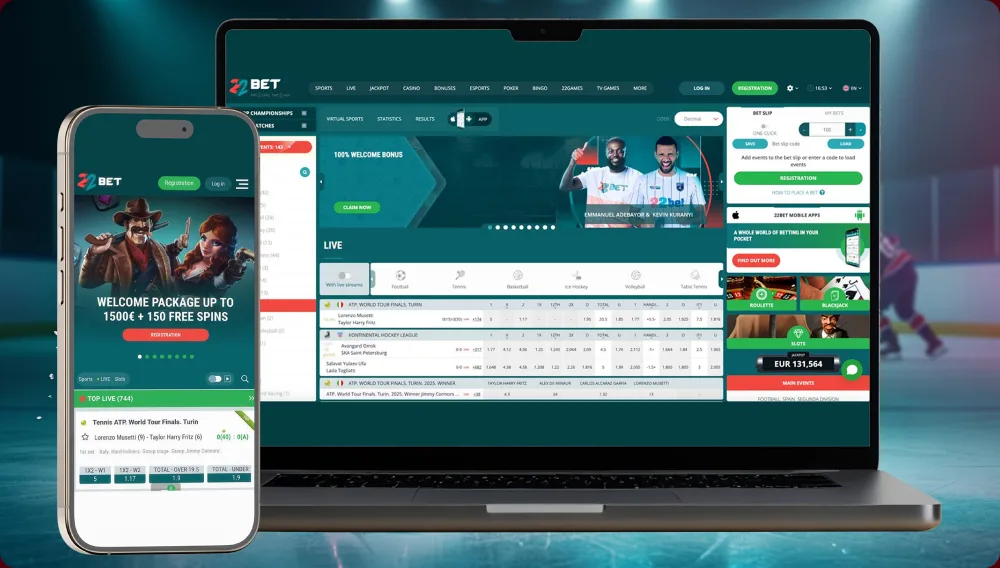
The phone site is not presented as a reduced demo. It opens the same main account areas: sports markets, in-play betting, live-dealer rooms, the casino catalogue described in the source as containing more than 9,000 games, and the cashier. A Swedish player can move between those sections without installing a separate package. Actual game and payment availability can still vary by location, account status and provider.
For light use, avoiding an installation is a practical advantage. There is no APK to replace, no store update to wait for and no permanent storage allocation. Open the page, enter the existing account and close the tab when the session ends. This route also suits anyone who prefers not to change Android security permissions or keep a gambling shortcut visible on the home screen.
The browser gives up a few device-level conveniences. It may not deliver the same push alerts, biometric entry or near-instant opening from an icon, and an installed interface can feel slightly more responsive during live betting. Those differences matter most to regular users. If none solves a real problem for you, the mobile site remains the simpler choice and still covers the essential account functions.
Join Now
Mobile Installation Routes for Android and iPhone
Android and iOS should be treated separately. Android commonly uses a package downloaded from the operator’s mobile page, while iPhone availability can depend on the App Store region and the option currently shown on the official site. Starting from a search result or an unrelated download directory creates unnecessary risk. Begin on the operator’s own mobile page and follow only the route displayed for your device in Sweden.
Installing the Android APK
The Android package may be supplied directly rather than through Google Play. Store policies and regional availability for real-money gambling apps differ, so an absent Play listing does not by itself explain whether the service is authorised in Sweden. It only changes the installation process. Check the file source before allowing the phone to open it.
On the Android phone, type the current 22Bet address into the browser and open the mobile-app area.
Choose Android, then leave the browser open until the APK download is complete.
If the phone refuses to open the package, allow installs for that browser or file manager only. Do not enable the permission for every app.
Open the completed download, read each prompt and confirm the installation.
Start the app and use the same account details as on the website, or register if the service is available to you.
 Download the
 android app
Do not take the APK from a mirror, message attachment or third-party catalogue. A copied file can be altered even when its name looks convincing. Once installation is complete, remove the temporary permission to install unknown apps. Android updates may require a fresh package from the same official mobile page, so repeat the source check every time rather than trusting an old bookmark to a download file.
Access on iPhone and iPad
Apple devices require a more cautious availability check because App Store listings can change between countries.
Open the 22Bet mobile page first. If it provides an App Store link for Sweden, use that link and verify the publisher shown on the listing.
Install only the version reached through that verified route. If no Swedish listing appears, continue with the browser site instead of using a foreign profile or unofficial installer.
Sign in with the same 22Bet account credentials after opening the approved app or mobile website.
 Download the
 IOS app
An authentic iOS app is updated by the App Store, and the installation should never ask for Android-style source permissions. Check availability again when you are ready to install: an app shown in another country’s store may not appear in the Swedish storefront.
Reasons to Choose the Installed Version
Installing does not create a second gambling account. The main sports, casino and cashier functions remain tied to the same profile used in the browser. The possible gain is in handling: the app can shorten the path back to a live market, retain device settings and use phone features that an ordinary browser tab may not offer. Four differences are the most relevant.

-
 Quicker access during a match Quick Bet and compact one-thumb navigation can reduce the number of taps needed to reopen a live market.
 -
 Optional phone alerts When enabled, they can show account notices, market changes and promotional messages.
 -
 Fingerprint or Face ID access On phones that support it, either method can be used at sign-in. This helps keep the account closed when somebody else picks up the device.
 -
 One profile across screens The balance and core account settings remain associated with the same login when moving between phone and computer.
On a small screen, the same range of markets, games and account tools leaves little empty space. Some people will settle into it quickly; others will find it busy even after several sessions. A first-time Swedish customer may be more comfortable learning the cashier and account pages in a browser before adding the app.
The source describes the live picture as sharp and low-latency when the connection is stable. Actual streaming quality still depends on the network, handset and event feed, and no app removes normal broadcast delay or guarantees that displayed odds will remain available. Before placing a bet, check that the app is up to date and read the selections shown on the slip.

Phone Requirements and Supported Systems
Most games load from the internet when opened; they are not stored on the handset. The installed package is therefore fairly small. The table records the baseline stated in the source material. Operating-system support, file size and store availability can change with later releases, so the current download page remains the final check.
| System | Indicative baseline | What to check |
|---|---|---|
| Android | Android 5.0 or later | About 30–50 MB in the source; obtain the APK only from the official mobile page |
| iOS | iOS 11 or later in the source | Confirm the current Swedish App Store listing and supported devices before installing |
| Connection | Stable Wi-Fi or mobile data | Video needs a stronger connection than ordinary account navigation |
Treat these figures as an orientation, not a permanent specification. Recent phones should have few problems with ordinary navigation, while older devices may struggle first with video or animation. If streams break up, try the same event on a stable Wi-Fi connection before concluding that the handset or application is at fault.
Account Verification and Mobile Security
Registration, deposits, betting and document upload can be handled from a phone, subject to availability and the checks applied to the account. There is no fixed stage at which every customer is verified. A document request may appear before a withdrawal, or sooner if payment, security or anti-money-laundering checks call for it. The phone camera is handy for photographing an ID and proof of address, provided the entire document is visible and the image is sharp and up to date.
Encryption cannot help when anyone can unlock the phone. Set a passcode and use fingerprint or face access only on your own device. If the browser is shared, do not let it remember the 22Bet login. Be cautious with an unexpected message asking you to approve a payment or confirm account details. After losing a phone, change the password and tell support immediately.

If the App Will Not Install or Stream Properly

When an APK refuses to open, first check three ordinary causes: permission for that particular source, a partial download and free storage. Broken or freezing video points more often to the connection. Try Wi-Fi, pause other downloads and see whether the same event improves. Login details do not change between the website and the app. If an Android update fails, get the latest package from the official mobile page; do not look for an alternative copy. The interface lists live chat as available around the clock. When contacting support, state the phone model, operating system and wording of the error.
App or Mobile Website for Swedish Players
The useful distinction is what each route lets you do, not how either one is advertised.
| Criterion | Installed option | Mobile website |
|---|---|---|
| Setup | Android APK or a verified iOS listing when available | No installation; open a supported browser |
| Live-market access | Usually fewer steps from the home screen | Responsive, with an extra browser step |
| Push alerts | Available where the device and app support them | Usually limited |
| Biometric entry | Possible on supported devices | Depends on browser and password manager |
| Account, offers and cashier | Same underlying account | Same underlying account |
| Best suited to | Frequent mobile and in-play use | Occasional use and first-time access |
The installed option makes most sense for someone who returns to live markets frequently and values alerts or biometric entry. For occasional sessions, the browser reaches the same account without adding a download or maintenance step. Swedish players should also check current availability before treating either route as open to their location.

Questions Swedish Mobile Users Often Ask

Who Gets the Most from the 22Bet App in Sweden?
The installed route is most useful when quick return access, alerts and device-level sign-in are part of the routine. Android installation demands more attention because the APK sits outside the normal Play workflow, while iPhone availability must be confirmed for the Swedish App Store at the time. Neither convenience removes the need to check local licensing, account eligibility and current software requirements.
For infrequent play, the mobile website is the more economical option: it uses no permanent storage and needs no separate update cycle. Regular in-play users may prefer the app’s shorter path back to an event. The underlying account remains the same, so the sensible choice is based on frequency and device preference rather than an expectation of extra games or guaranteed faster betting.
Set money and time limits before convenience becomes habit. Mobile access keeps the account close at hand, which is precisely why session reminders, spending boundaries and regular breaks should be decided in advance.

Safer Gambling Support for Sweden
In Sweden, gambling is for people aged 18 or older. Before a session, set both a money limit and a time to stop, then use whichever limit or exclusion controls are available in the account. Spelpaus covers operators with a Swedish licence. It may not block a company outside that licensing system. Stödlinjen provides anonymous, free support at 020-81 91 00 and stodlinjen.se. If gambling is affecting your budget, job or relationships, stop playing and contact them.
